
The Becauze take
The reason this matters
Choose a tablet when travel tasks center on streaming, browsing, light typing and shared entertainment; carry a laptop when your hotel-room work depends on a more traditional computer setup, longer typing sessions or software and workflows that a tablet may not replace.
At a glance
What to know first
- A tablet is the better fit for travel centered on entertainment, browsing, reading, light typing and family sharing.
- A laptop is worth carrying when sustained typing, desktop software or a computer-first workflow is central to the trip.
- A keyboard-equipped tablet can broaden its role, but listing claims do not establish laptop-equivalent compatibility or performance.
- Battery capacity does not predict real-world runtime; verify charger, cable and destination power requirements.
- Cases and stands can improve travel usability but add to the packing decision.
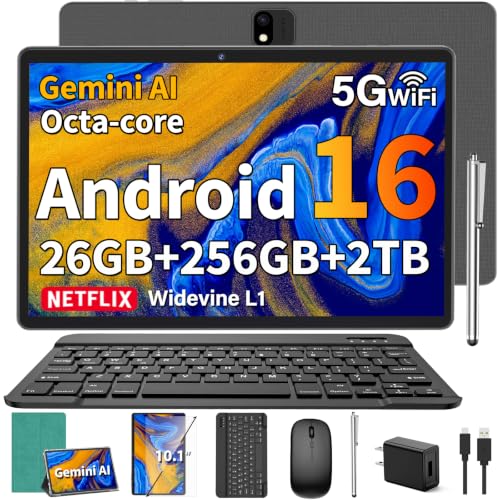
- The YLEEBG Android 16 tablet with keyboard is a verified example; its listed price is $109.99 at the time of capture, with availability subject to change.
Featured products
Shop the products mentioned




Prices, sellers and availability can change. Each link opens the corresponding product at the retailer shown on the card.
Explore the category
Browse the relevant Amazon categories
Category rankings, selection, prices and availability can change on Amazon.
Decision guide
Tablet or laptop for common holiday-travel needs
| Travel need | Tablet | Laptop | Where to check |
|---|---|---|---|
| Airline entertainment | Strong fit for reading, streaming and browsing; easier to use as a personal screen. | Useful, but may be more setup than needed for casual entertainment. | Check on Amazon ↗ |
| Short emails and notes | A keyboard-equipped model can handle light typing and note-taking. | Comfortable choice when typing is a central task. | Check on Amazon ↗ |
| Hotel-room work | Can work for lighter tasks if apps and files are compatible. | Better fit when the trip requires a computer-first workflow. | Check on Amazon ↗ |
| Family sharing | Flexible for streaming, browsing and passing between users. | More useful if one traveler needs it for work. | Check on Amazon ↗ |
| Charging plan | Verify battery claims, charger and cable; capacity alone does not establish runtime. | Plan around the laptop’s charger and destination outlets. | Check on Amazon ↗ |
| Packing accessories | May require a keyboard, case, charger and possibly a stand. | Usually needs a protective sleeve, charger and optional stand. | Check on Amazon ↗ |
Start with the trip, not the device category
The best holiday-travel device is the one that matches what you will actually do away from home. A tablet can be easier to justify when the trip involves reading, streaming, browsing, video calls, note-taking and occasional email. A laptop becomes easier to justify when the device is part of the trip’s work equipment rather than simply a screen for downtime.
Packing space matters, but it is only one part of the decision. You also need to account for the charger, keyboard, case and any stand or adapter. A tablet with a keyboard can cover more tasks than a bare tablet, but those accessories also affect how compact the travel setup remains. A laptop may be the simpler single-device solution if you already need a full computer workflow.
Airline use: portability helps, but setup still matters
Airline use usually rewards a device that can be taken out, used in a confined space and put away without much rearranging. A tablet is naturally suited to reading, downloaded entertainment, casual browsing and short messages. Its touch interface can also be convenient when a tray table is crowded or you do not want to deploy a separate mouse.
A keyboard-equipped tablet can make longer typing more practical, but it is still important to think about posture and surface area. The verified YLEEBG Android 16 tablet includes a keyboard, mouse, stylus, case and screen protector, so its bundle is designed around switching between touch use and laptop-like tasks. The supplied listing describes a 10-inch display, 8,000mAh battery and USB-C charging, but it does not establish independent battery testing or real-world airline endurance.
A laptop may be preferable if you expect to type continuously during a flight or need your familiar computer applications. The tradeoff is that you should plan for a more structured setup, including a stable surface and protection for the device.
Hotel-room productivity is where the gap becomes clearer
In a hotel room, the question is less about whether a tablet can open email and more about how comfortably it handles the entire work session. For short messages, trip planning, document review and video calls, a tablet with an included keyboard may be enough. The YLEEBG listing also describes split-screen functionality, Google support and a stylus, which could be useful for note-taking or keeping reference material visible while typing. These are manufacturer or listing claims, not independent performance findings.
A laptop is worth carrying when your workflow depends on sustained keyboard use, several desktop-style applications or accessories that are already organized around a computer. A tablet can become a “mini laptop” with the right accessories, but that does not guarantee the same software compatibility or comfort for every traveler. Before choosing, list the exact tasks you must complete and check whether each app, website and file type works on the operating system you plan to use.
For occasional travel work, a tablet’s lighter, more flexible setup may be attractive. For a work-heavy trip, avoiding a device switch or compatibility workaround may matter more than saving space.
Battery strategy: capacity is not the same as runtime
Travel charging is a planning problem rather than a simple capacity contest. A tablet may be easier to keep available for reading and entertainment, while a laptop may be the more dependable choice if you need a full work session and already know its charging routine. However, the supplied evidence does not provide comparable battery-runtime testing for either device class.
The YLEEBG listing identifies an 8,000mAh battery and includes a USB-C charger cable and charging head. That gives shoppers concrete information to verify, but it does not establish how long the tablet will last under streaming, typing, video calls or gaming. Travelers should check the included charger, cable requirements and whether their destination uses a different outlet format.
For international travel, the VINTAR Italy travel plug adapter is a relevant accessory only for destinations using the supported plug format. Its listing says it has USB-A and USB-C ports and supports devices rated for 100V to 250V, but it is not a voltage converter. Verify both the destination outlet and every device’s voltage requirements before relying on it.
Family sharing changes the calculation
A shared family device has different priorities from a personal work computer. A tablet is often the more flexible choice for passing between travelers for streaming, games, reading, photos or video calls. The YLEEBG tablet listing specifically describes HD streaming support through Widevine L1 and dual cameras, though the supplied evidence does not independently verify viewing quality or camera performance.
A laptop can still be the better shared device when one traveler needs it for work and others only use it occasionally. In that case, sharing may create scheduling conflicts rather than reduce the number of devices. Consider whether the device will be used by one person at a time, whether separate accounts are needed and whether the keyboard must remain attached.
If the trip includes both family entertainment and meaningful work, a tablet-plus-laptop combination may be justified, but it defeats the goal of minimizing luggage. Make the choice based on the most demanding task, not the easiest one.
Travel protection and hotel ergonomics
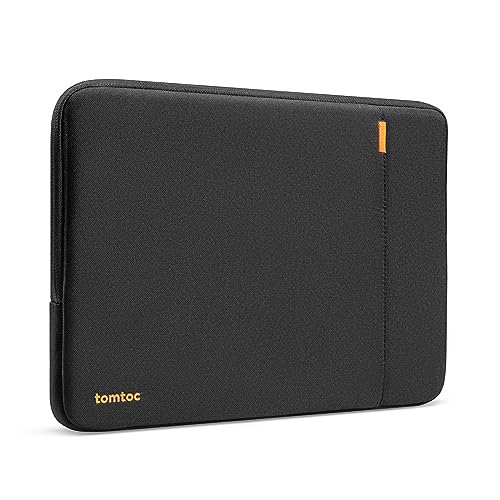
Once you choose a computer, protection and positioning can affect how useful it is on the road. The tomtoc 360° Protective Laptop Sleeve is listed for compatible MacBook, Surface and other laptop models and includes a front pocket for accessories. The listing describes padding, corner protection and spill-resistant fabric, but shoppers should confirm that their exact device fits before buying.
The Kinmac 360° Protective Laptop Sleeve Case is listed as compatible with several laptop types and an iPad Pro category. It has a handle, water-resistant construction and an accessory pocket. Because the compatibility list spans different devices, verify dimensions and model fit rather than assuming a tablet or laptop will fit securely.
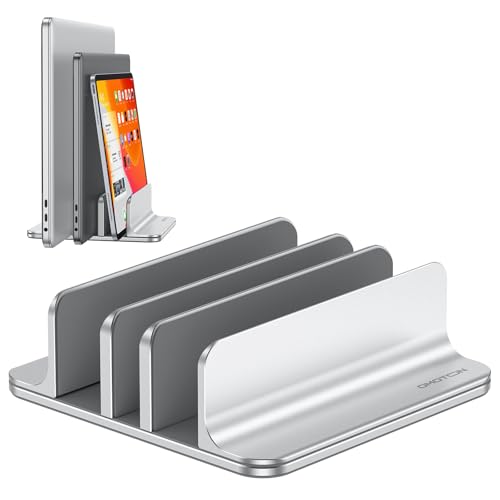
For hotel-room work, the SOUNDANCE Laptop Stand is described as supporting devices from 10 to 15.6 inches, with a raised viewing position, ventilation and space underneath for an external keyboard. The OMOTON three-slot stand is intended for laptops of different thicknesses and can hold multiple devices, but it is a desk accessory rather than a solution for airline use. Both add packing volume, so bring one only if the ergonomic benefit will be used regularly.
A practical decision rule
Choose the tablet path if your essential tasks are streaming, browsing, reading, video calls, light typing, handwritten notes and family sharing. The verified YLEEBG tablet is one example of a keyboard-equipped setup with a stylus and case, but its listing does not prove that it replaces every laptop workflow.
Choose the laptop path if you need sustained typing, established desktop software, a familiar file-management routine or a computer-first workday. Carrying a laptop may be worthwhile even when it takes more planning, because avoiding compatibility problems can matter more than minimizing device size.
Before buying, check current Amazon pricing and availability, exact device compatibility, charger requirements, operating-system support and return terms. The supplied prices are snapshots, not promises that they will remain unchanged. For broader discovery, Amazon’s Computer Tablets and Computers & Tablets categories can help you explore additional options without treating category pages as specific product recommendations.
Explore more options on Amazon
To explore beyond the featured picks, browse LGBTQ+ Travel and Computer Tablets on Amazon. These categories let you compare the wider selection and narrow your options by the features, dimensions and budget that matter to you. Category placement is not an endorsement of every listing.
For a more focused starting point, search Amazon for Android tablet with detachable keyboard or Apple iPad with keyboard case. Refine the results to suit your needs, and check the exact model, seller, current price and return terms before choosing. Search results change and are not individually vetted recommendations.
Before you buy
What to verify
- No independent testing, customer ratings, review totals or battery-runtime comparisons were supplied.
- The article compares device classes conceptually; it does not establish that every tablet or laptop shares the same capabilities.
- Product prices and availability can change after capture.
- Accessory compatibility must be checked against the exact device model and dimensions.
- The VINTAR adapter is destination-specific and does not convert voltage.
Reader questions
Frequently asked questions
It can be enough when your main tasks are streaming, reading, browsing, video calls, light typing and family sharing. Check every required app and file type first.