
The Becauze take
The reason this matters
Choose a USB-C hub when portability and a few extra connections matter most. Choose a dock when your laptop is becoming the center of a permanent workstation. A USB-C monitor can be the better alternative when the display itself should provide the main connection point.
At a glance
What to know first
- A compact hub is usually the better fit for travel, one display and a limited number of peripherals.
- A full dock is the more suitable alternative for dual monitors, wired Ethernet, high-speed data and one-cable desk connectivity.
- A USB-C monitor can simplify a second-screen setup when the laptop supports USB-C DisplayPort Alt Mode.
- The Anker data hub does not support charging, while the Belkin and LENTION hubs list power-delivery features.
- Check the laptop’s exact USB-C capabilities and the product’s compatibility notes before ordering.
Featured products
Shop the products mentioned




Prices, sellers and availability can change. Each link opens the corresponding product at the retailer shown on the card.
Decision guide
Which type of connection setup fits?
| Option | Best for | Notable listed capabilities | Main check before buying | Where to check |
|---|---|---|---|---|
| Compact USB-C hub | Travel, one display and everyday peripherals | HDMI, USB, card readers or pass-through charging depending on model | Confirm video output, charging and port limits for the laptop | Check on Amazon ↗ |
| Full USB-C dock | Permanent desk, dual monitors and wired networking | Dual-display support, Ethernet, up to 100W power delivery and 10Gbps data on the Belkin dock | Verify operating-system, display and DisplayLink requirements | Check on Amazon ↗ |
| USB-C monitor | A second screen with fewer separate desk components | USB-C and HDMI inputs, 4K display, kickstand and VESA mounting on the VisionOwl monitor | Confirm USB-C DisplayPort Alt Mode and power behavior | Check on Amazon ↗ |
| Single-purpose adapter | One missing connection, such as USB-A or Ethernet | USB-A conversion or Gigabit Ethernet, depending on adapter | Do not expect display, charging or multiport functionality unless listed | Check on Amazon ↗ |
Start with the setup you actually need
The difference between a USB-C hub and a dock is less about the label and more about the number of jobs one connection must handle. If you need HDMI for a presentation, card readers for photos or a few USB ports for peripherals, a compact hub may be enough. If you want two displays, wired Ethernet, high-speed storage and laptop charging through one cable, a full docking station is the more appropriate category.
Portability is another dividing line. A small hub can stay in a laptop bag and solve occasional connection problems without turning travel gear into a desktop setup. A dock is intended to remain connected to monitors, accessories and power at a desk. Before buying either, confirm that your laptop's USB-C port supports the video, data or charging functions you plan to use; not every USB-C port has the same capabilities.
When a compact hub is the better alternative
A hub is a sensible choice for a laptop that mainly needs one external display and a handful of accessories. The Belkin USB-C Hub 7-Port 4K HDMI SD MicroSD 100W PD is the strongest fit among the listed compact options for users who need HDMI, memory-card readers and pass-through charging in a travel-friendly design. Its listed features include HDMI 2.0 output up to 4K at 60Hz, SD and microSD readers, USB connections, and up to 100W power delivery. Belkin also lists compatibility with Neo MacBook, iPad Pro and Chromebook, but your specific device should still be checked before purchase.
For a simpler data-only expansion, the Anker USB C Hub, USB Extender, 4-in-1 USB Splitter is a narrower option. It offers four USB connections and 5Gbps data transfer, but its listing explicitly says charging is not supported. That makes it useful for connecting peripherals or moving files, not for replacing a dock that powers a laptop.
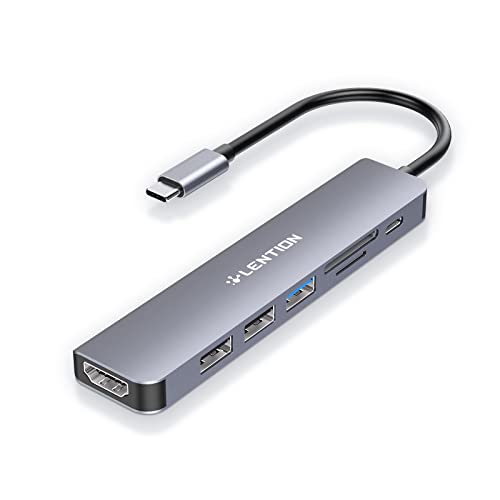
The LENTION 7-in-1 USB C Hub occupies the middle ground. It lists 4K at 60Hz HDMI, SD and microSD readers, USB ports and up to 100W input with up to 90W pass-through charging. It also lists support for macOS, iOS/iPadOS, Windows and ChromeOS, while warning that certain devices are not supported and that buyers should consult the detailed compatibility list. That warning matters more than the broad operating-system list.
When a full dock is worth the extra hardware
A full dock is the better alternative when your laptop is used as a desktop replacement. The Belkin DisplayLink Dual Display Docking Station is the clearest fit for a two-monitor workstation: its listed features include up to two displays through HDMI or DisplayPort, DisplayLink support, up to 4K at 60Hz, up to 100W power delivery, 1Gb Ethernet and 10Gbps data transfer. It is also listed as compatible with Windows and MacBook devices.
This is the option to investigate when your priority is leaving one cable connected at a desk. It also has VESA-mounting and Kensington Lock compatibility, which may matter in an organized office or shared workspace. The tradeoff is size, cost and complexity compared with a small travel hub. Its listed price is $219.99 at the time of capture, but prices can change and the listing should be checked before ordering.
The dock's DisplayLink approach is a specification to verify against your own workflow, especially if you have a particular operating system, display arrangement or corporate-device policy. The listing supports the dual-monitor use case, but it does not establish that every laptop configuration will behave identically. Confirm the host device, monitor connections and required software or permissions before buying.
When a USB-C monitor makes more sense
A USB-C monitor can reduce the number of separate desk components when the display is the main connection point. The VisionOwl Portable Monitor lists USB-C and standard HDMI inputs, a built-in kickstand, speakers, VESA mounting and a 4K display. Its listing says a laptop with USB-C DisplayPort Alt Mode can use a single USB-C cable for video and power, while HDMI connections use a separate power arrangement described in the listing.
This is a useful alternative for mobile workers who want a second screen without committing to a traditional dock-and-monitor arrangement. It can also suit someone who needs a portable display rather than a permanent multi-peripheral hub. However, it is not a direct replacement for a dock when you need several USB devices, wired Ethernet or two external monitors. The listing price is $229.99 at the time of capture, so compare the total setup—not just the monitor—with the cost of a dock and existing display.
Small adapters that solve specific problems
Not every laptop setup needs a hub or dock. The Anker USB C Adapter 2-Pack converts a USB-C port to USB-A for older peripherals such as drives, phones, mice and printers. It is a focused fix for legacy USB-A connectivity, not a display or charging solution. Its listed price is $12.99 at the time of capture.
For a wired-network requirement, the Anker USB C to Ethernet Adapter lists 10/100/1000Mbps connectivity and a compact aluminum design. It is a good alternative when the laptop already has enough ports and only needs Ethernet. It does not replace a multiport dock for displays, card readers or several accessories. The listed price is $16.99 at the time of capture.
The JSAUX 90 Degree USB C to USB C Adapter 2-Pack is an accessory for cable routing rather than a hub. Its listed features include a right-angle design, up to 240W power delivery, up to 40Gbps data transfer and video support up to 8K at 60Hz on compatible equipment. Those capabilities depend on the connected cable, laptop, charger and display, so it should be treated as a connection-management accessory, not as a docking station.
How to choose before checkout
First, count the connections you need at the same time: displays, Ethernet, USB-A devices, card readers, storage and power. Second, decide whether you need one display or two. Third, check the laptop's USB-C capabilities, including video output, power input and data speed. Fourth, compare the operating-system and device compatibility language rather than relying only on a product title.
If you are still unsure, explore the exact Amazon category label USB-C dock for laptop dual monitor for broader dock options, or USB-C hub with HDMI and Ethernet for smaller combinations of ports. These are discovery destinations, not guarantees that a particular product, price or configuration is available.
Explore more options on Amazon
For a more focused starting point, search Amazon for USB-C dock for laptop dual monitor or USB-C hub with HDMI and Ethernet. Refine the results to suit your needs, and check the exact model, seller, current price and return terms before choosing. Search results change and are not individually vetted recommendations.
Before you buy
What to verify
- Manufacturer-listed features are not independent testing results.
- USB-C capabilities vary by laptop and port; confirm video output, charging and data support before buying.
- Display resolution and charging performance depend on the connected laptop, display, cable, charger and other equipment.
- The LENTION listing includes device exclusions and advises buyers to consult its compatibility lists.
- Captured prices and availability can change.
- Amazon category-search pages are discovery tools, not verified recommendations for a particular product or stock status.
Reader questions
Frequently asked questions
A hub usually adds a smaller selection of ports in a portable form. A dock is designed for a fuller desk setup, such as multiple displays, Ethernet, several peripherals and laptop charging through one connection.